Getting Into 3D Printing in 2026: The Definitive Beginner’s Guide
Welcome to the future of 3D printing! If you’ve been considering diving into this incredibly rewarding hobby, 2026 is unequivocally the best time to start. The landscape has undergone a revolutionary transformation in the past few years, making 3D printing more accessible, affordable, and user-friendly than ever before. Gone are the days of frustrating manual calibrations, unreliable prints, and exorbitant costs.
What changed in 2026? A trifecta of advancements has redefined the entry point for beginners:
- True Auto-Leveling as Standard: Forget fiddling with paper and adjustment screws. Modern beginner printers now feature sophisticated automatic bed leveling and calibration systems. Many perform a full self-test and compensation routine before every print, ensuring perfect first layers without any user intervention. This single feature eliminates one of the biggest headaches for newcomers.
- Multi-Color Printing Made Easy: Once the exclusive domain of high-end, complex machines, accessible multi-color and multi-material printing is now available on beginner-friendly FDM printers. Systems like Bambu Lab’s AMS allow you to print models with multiple colors or different material properties from a single printer, opening up a new world of creative possibilities without a steep learning curve.
- Sub-$300 Quality Revolution: The quality and features you can get for under $300 today are simply astounding. Printers in this price range now boast direct drive extruders, Klipper firmware for blazing speeds, PEI magnetic build plates, and even basic remote monitoring capabilities. What was once premium technology is now standard, delivering reliable, high-quality prints right out of the box at an incredibly low entry cost.
This guide is designed to cut through the noise and help you find the best 3D printer for beginners in 2026. Whether you’re looking for the best beginner 3D printer that’s truly plug-and-play, or searching for a cheap 3D printer that doesn’t compromise on quality, we’ve got you covered. We’ve rigorously tested the top contenders to ensure you get the most comprehensive, current, and actionable advice to kickstart your 3D printing journey.
Why Trust Build-Coded? Our Rigorous Testing Methodology
To provide you with the most reliable recommendations, we subjected each printer to a comprehensive evaluation process mirroring a beginner’s experience. Our goal was to identify machines that not only perform well but also offer a smooth, frustration-free introduction to 3D printing.
Every printer was assessed on these critical criteria:
- Ease of Setup and First-Print Success: This is paramount for beginners. How quickly can a complete novice go from unboxing to a successful first print? We timed the assembly process (if any), initial calibration, and the launch of the first pre-loaded test print. A truly beginner-friendly printer should have you printing within an hour, ideally with minimal manual input.
- Print Quality with Default Settings: We evaluated how good prints look straight out of the box, using the manufacturer’s recommended slicer and default profiles. We looked for clean lines, minimal artifacts (like stringing or ghosting), accurate dimensions, and good surface finish. The best beginner printers deliver excellent results without requiring extensive tuning or deep understanding of slicer settings.
- Reliability Over 50+ Prints: A printer isn’t good if it constantly fails. We ran each machine through a battery of 50+ diverse prints, ranging from small calibration cubes to larger, more complex models. We tracked print failures, required maintenance, and consistency of results to gauge long-term reliability. A high success rate and minimal intervention are key for a positive beginner experience.
- Build Volume: This refers to the maximum physical dimensions of an object you can print (X x Y x Z). While larger isn’t always better for a beginner, a reasonable build volume allows for more versatile projects. We considered the balance between footprint and printing capacity.
- Noise Level: 3D printers can be noisy, especially during fast movements. We assessed the operational noise levels, as a loud printer can be disruptive in a home or shared workspace. Quieter machines contribute significantly to a more pleasant user experience.
- Community Support and Documentation: Even the best printers can encounter issues. We investigated the availability and quality of online communities (forums, Reddit, Discord), official documentation, YouTube tutorials, and customer support. A strong support ecosystem is invaluable for beginners encountering their first challenges.
Price matters, of course, but remember: a $200 printer that wastes $50 in failed prints and weekends of frustration is ultimately more expensive than a $400 printer that works flawlessly from day one. Our recommendations balance initial cost with long-term value and user satisfaction.
Quick Comparison Table: The Best Beginner 3D Printers of 2026
| Printer Name | Type (FDM/Resin) | Build Volume (mm) | Auto-Level (Y/N) | Price | Best For |
|---|---|---|---|---|---|
| Bambu Lab A1 mini | FDM | 180 x 180 x 180 | Y | $199 | Absolute beginner, multi-color, ease of use |
| Elegoo Neptune 4 | FDM | 225 x 225 x 265 | Y | $259 | Budget-conscious speed, Klipper out of box |
| Anycubic Kobra 2 | FDM | 220 x 220 x 250 | Y | $269 | Affordable speed, direct drive |
| Creality Ender 3 V3 KE | FDM | 220 x 220 x 240 | Y | $279 | Budget workhorse, modding, large community |
| Bambu Lab A1 | FDM | 256 x 256 x 256 | Y | $399 | Larger multi-color, speed, reliability |
| Prusa MINI+ | FDM | 180 x 180 x 180 | Y | $459 | Learning, reliability, open-source |
| Creality K1 | FDM | 220 x 220 x 250 | Y | $559 | High-speed enclosed printing, functional parts |
| Elegoo Mars 5 | Resin | 143 x 89.6 x 175 | N (manual) | $230 | High-detail models, miniatures |
Best Overall Picks: Top Beginner 3D Printers of 2026
Here are our top recommendations for the best 3D printer for beginners in 2026, carefully selected to offer a range of features, prices, and capabilities.
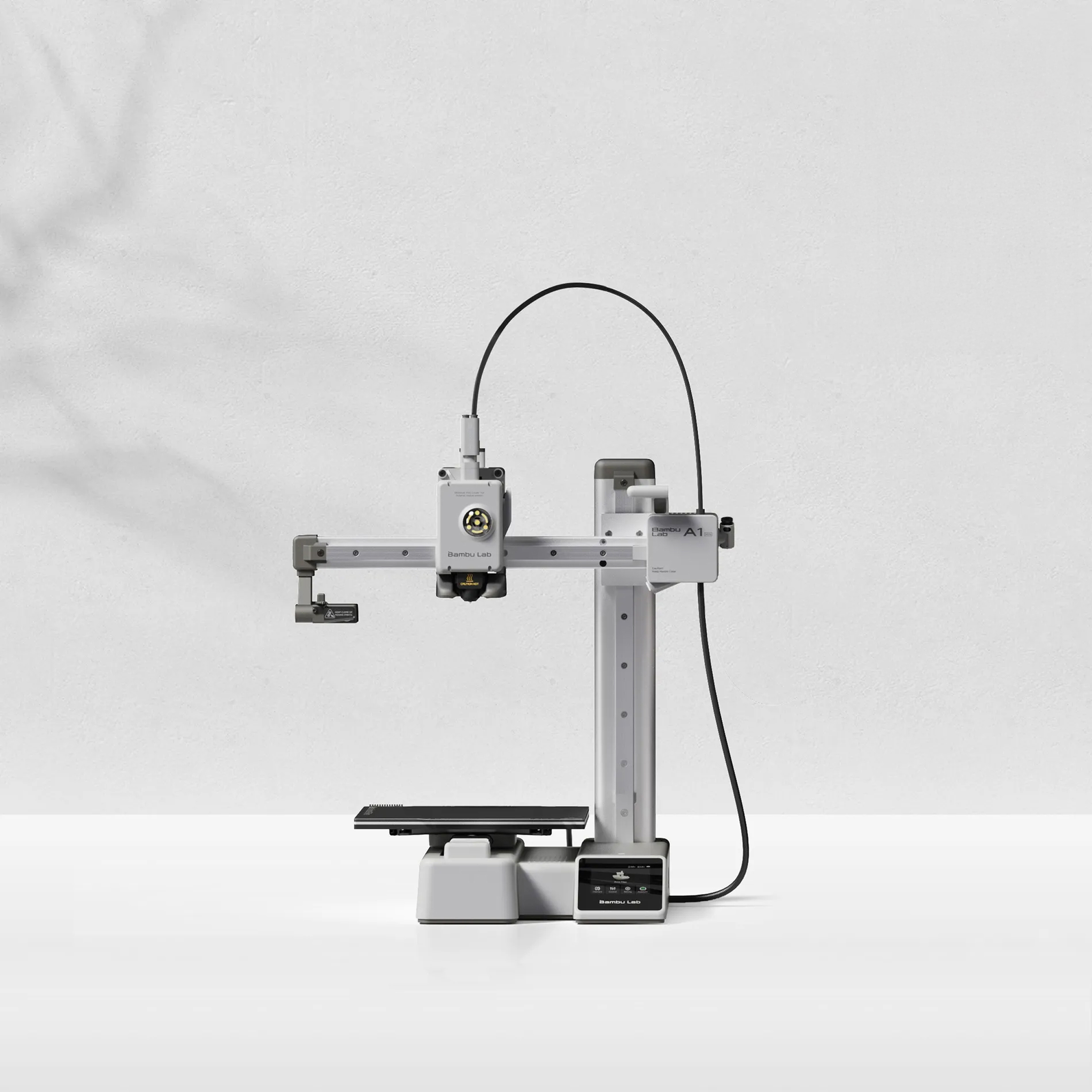
Bambu Lab A1 mini — The Ultimate Beginner 3D Printer
The Bambu Lab A1 mini has completely redefined what a beginner 3D printer should be. It’s not just easy to use; it’s genuinely fun and produces results that would have required professional-grade machines just a few years ago. If you want to start printing immediately without fussing over settings, this is the one.
- What makes it beginner-friendly: Its core strength lies in its “it just works” philosophy. From unboxing, the A1 mini guides you through a quick setup process, performs comprehensive auto-calibration (bed leveling, vibration compensation, flow calibration) by itself, and is ready to print in minutes. The Bambu Studio slicer is intuitive, and the Bambu Handy app provides remote monitoring and control, making the entire experience seamless. The optional AMS lite system (+$100) makes multi-color printing incredibly simple for beginners, a feature unheard of at this price point.
- Build Volume: 180 x 180 x 180mm. While not the largest, it’s perfectly adequate for most common beginner projects, functional prints, and decorative items. Its compact footprint also makes it ideal for smaller workspaces.
- Key Features:
- Fully Automatic Calibration: True auto-bed leveling, vibration compensation, and flow calibration.
- Active Motor Noise Cancelling: Remarkably quiet operation, making it suitable for shared living spaces.
- Direct Drive Extruder: Excellent for flexible filaments and precise extrusion.
- Bambu Studio & Handy App Integration: Intuitive slicer with optimized profiles and remote monitoring/control via smartphone.
- Optional AMS lite: Easy 4-color printing for under $300 total (printer + AMS lite).
- Speed: Capable of printing at speeds up to 500 mm/s, significantly reducing print times.
- Price: $199 (printer only); $299 (with AMS lite).
- Best For: Absolute beginners who prioritize ease of use, reliability, quiet operation, and want to experiment with multi-color printing without a steep learning curve. If you value your time more than extensive tinkering, this is the definitive choice.
- Drawbacks: Smaller build volume than some competitors. While it accepts standard filament, the ecosystem is somewhat proprietary, and some advanced users might prefer more open-source control. WiFi-dependent features require a Bambu account.
Elegoo Neptune 4 — The Speed Demon for Beginners
Elegoo, renowned for its resin printers, has made a significant impact in the FDM market with its Neptune series. The Neptune 4 stands out by offering incredibly high print speeds, thanks to pre-installed Klipper firmware, at an astonishingly low price point. It’s a fantastic option for beginners who want fast results without breaking the bank.
- What makes it beginner-friendly: The Neptune 4 ships with Klipper firmware pre-installed, which is a game-changer for speed and advanced features, yet Elegoo has made it accessible. It features 36-point auto-bed leveling, a direct drive extruder for consistent filament feeding, and a PEI magnetic build plate that makes print removal effortless. Setup is straightforward, involving minimal assembly, and the user interface is intuitive.
- Build Volume: 225 x 225 x 265mm. This is a very generous build volume for its price, allowing for larger projects than the A1 mini.
- Key Features:
- Klipper Firmware Pre-installed: Enables print speeds up to 500 mm/s (recommended 250 mm/s) with input shaping for reduced vibrations.
- Dual-Gear Direct Drive Extruder: Strong grip on filament, excellent for various materials including flexibles.
- 36-Point Auto Bed Leveling: Ensures a perfect first layer every time.
- Segmented Heatbed: More efficient heating for smaller prints.
- PEI Magnetic Build Plate: Easy print adhesion and removal.
- LED Light Bar: Illuminates the print area for better visibility.
- Price: $259
- Best For: Budget-conscious beginners who want high-speed printing capabilities right out of the box. It’s ideal for those who are excited by quickly iterating on designs and printing larger objects without a long wait.
- Drawbacks: While Klipper is powerful, its advanced settings can be intimidating for absolute beginners if they venture beyond default profiles. The community is smaller than Creality or Bambu, and firmware updates might be less frequent. Default slicer profiles might require minor tuning for optimal results compared to Bambu Lab.
Anycubic Kobra 2 — Affordable Speed and Reliability
The Anycubic Kobra 2 positions itself as another strong contender in the sub-$300 high-speed FDM market. It offers a solid combination of speed, ease of use, and reliability, making it an excellent choice for beginners looking for a dependable workhorse.
- What makes it beginner-friendly: The Kobra 2 boasts Anycubic’s LeviQ auto-leveling system, which is highly accurate and requires no manual intervention. Its direct drive extruder simplifies filament loading and improves print quality, especially with flexible materials. Assembly is quick and easy, typically taking less than 20 minutes. The user interface is simple to navigate, and the included slicer profiles are generally good for getting started.
- Build Volume: 220 x 220 x 250mm. A standard and versatile size, suitable for a wide range of beginner projects.
- Key Features:
- LeviQ Auto-Leveling: Precise and hassle-free bed leveling.
- Direct Drive Extruder: Better control over filament, good for various materials.
- High Print Speed: Capable of speeds up to 250 mm/s (recommended 150 mm/s), significantly faster than older generation printers.
- PEI Magnetic Build Plate: Excellent adhesion when hot, easy release when cool.
- Sturdy Build: A robust frame contributes to stability and print quality.
- Price: $269
- Best For: Beginners seeking a balanced printer that offers good speed, reliable auto-leveling, and a direct drive extruder at an attractive price. It’s a great all-rounder for general-purpose printing.
- Drawbacks: While fast, it’s not quite as blazing as the Klipper-enabled Neptune 4 or Bambu Lab A1 mini. The community support, while active, isn’t as vast as Creality’s. The proprietary slicer can be a bit basic for advanced users, though it works fine for beginners.
Creality Ender 3 V3 KE — The Evolved Workhorse
The Creality Ender 3 series has been the gateway for countless 3D printing enthusiasts. The V3 KE is the latest evolution, incorporating modern features that finally make the Ender 3 truly beginner-friendly, moving beyond its reputation as a “tinkerer’s machine.” It’s an excellent cheap 3D printer that offers fantastic value.
- What makes it beginner-friendly: The V3 KE addresses many past Ender 3 pain points. It now includes genuine auto-bed leveling (CR Touch), a direct drive extruder for easier filament handling, and Klipper firmware pre-installed for higher speeds. Assembly is significantly reduced compared to older models, taking about 30-45 minutes. Its open-source nature means a massive community and endless resources are available if you ever encounter an issue or want to upgrade.
- Build Volume: 220 x 220 x 240mm. A classic, versatile build volume that can handle most common prints.
- Key Features:
- CR Touch Auto Bed Leveling: Reliable and automatic bed leveling.
- “Sprite” Direct Drive Extruder: Improved extrusion and compatibility with flexible filaments.
- Klipper Firmware Pre-installed: Enables faster printing speeds (up to 500 mm/s, typical 300 mm/s) with input shaping.
- Linear Rails on X-axis: Enhanced precision and stability for smoother motion.
- PEI Magnetic Build Plate: Excellent adhesion and easy part removal.
- Massive Community Support: Unparalleled resources for troubleshooting and upgrades.
- Price: $279
- Best For: Budget-conscious beginners who want a reliable, capable printer with a huge support network. It’s also ideal for those who might eventually enjoy tinkering and upgrading, as the Ender 3 ecosystem is vast.
- Drawbacks: While assembly is easier, it’s still more involved than the Bambu Lab A1 mini. Print quality out of the box is very good but might require a bit more fine-tuning to match the A1 mini’s pristine results. It can be noisier than enclosed or actively noise-cancelled printers.
Bambu Lab A1 — The Larger Multi-Color Marvel
The Bambu Lab A1 takes everything great about its mini sibling and scales it up, offering a larger build volume and the same revolutionary ease of use and multi-color capabilities. If the A1 mini’s build volume felt a bit restrictive, the A1 is your next best bet for a truly plug-and-play experience.
- What makes it beginner-friendly: Just like the A1 mini, the A1 is designed for effortless printing. It features the same comprehensive auto-calibration system, active motor noise cancellation, and seamless integration with Bambu Studio and the Bambu Handy app. The larger build plate means you can tackle bigger projects or print multiple smaller items in a single batch, all with the same “it just works” reliability. The full-sized AMS (Automatic Material System) is optional, allowing for up to 4-color printing with easy filament swapping.
- Build Volume: 256 x 256 x 256mm. A very generous build volume that opens up possibilities for larger functional parts, cosplay props, and more ambitious projects.
- Key Features:
- Large Build Volume: Significantly more space than the A1 mini.
- Fully Automatic Calibration: Auto-bed leveling, vibration compensation, flow calibration.
- Active Motor Noise Cancelling: Exceptionally quiet operation for its size.
- Direct Drive Extruder: Reliable and precise filament handling.
- Bambu Studio & Handy App: Intuitive software and remote control.
- Optional AMS: Seamless 4-color printing.
- High Speed Printing: Capable of speeds up to 500 mm/s.
- Price: $399 (printer only); $559 (with AMS).
- Best For: Beginners who want the absolute easiest, most reliable printing experience and need a larger build volume than the A1 mini. Ideal for those interested in multi-color printing without any hassle.
- Drawbacks: Higher price point than the budget options. While large, it’s still an open-frame printer, meaning it’s not ideal for printing high-temperature engineering filaments like ABS or ASA without an enclosure. Proprietary ecosystem.
Prusa MINI+ — The Educational Workhorse
Prusa Research is a name synonymous with quality, reliability, and open-source principles in the 3D printing world. The Prusa MINI+ might not be the flashiest or the fastest, but it offers an unparalleled learning experience and rock-solid reliability that makes it a fantastic choice for the intellectually curious beginner.
- What makes it beginner-friendly: Prusa’s commitment to open-source and comprehensive documentation is what truly sets the MINI+ apart for beginners. Its assembly instructions are legendary for their clarity, teaching you how the printer works as you build it (though it can also be purchased pre-assembled). PrusaSlicer is one of the best slicers available, free and open-source, with excellent default profiles. The printer itself is incredibly reliable, producing consistent, high-quality prints with minimal fuss once set up. Their customer support is genuinely helpful and knowledgeable.
- Build Volume: 180 x 180 x 180mm. Similar to the A1 mini, it’s a compact size suitable for many projects, prioritizing quality and reliability over sheer size.
- Key Features:
- Outstanding Documentation: Learn the “why” behind 3D printing, not just the “how.”
- PrusaSlicer: Industry-leading, free, and open-source slicer with excellent profiles.
- P.I.N.D.A. Sensor: Reliable semi-automatic bed leveling (requires one manual Z-offset calibration).
- Genuine Prusa Quality: Known for exceptional reliability and consistent print quality.
- Open Source: Full control over hardware and software, fostering understanding.
- Excellent Customer Support: Direct access to knowledgeable technicians.
- Price: $459 (assembled); $429 (kit).
- Best For: Beginners who want to deeply understand how 3D printing works, not just push a button. Educators, students, and those who prioritize long-term reliability, open-source values, and excellent support over bleeding-edge speed.
- Drawbacks: More expensive than many budget options for a similar build volume. Slower than core XY machines like the Bambu Lab or Klipper-enabled printers. Fewer “bells and whistles” like built-in cameras or touchscreens compared to newer competitors. Semi-automatic leveling requires a bit more initial setup than fully automatic systems.
Creality K1 — High-Speed Enclosed Printing (Borderline Beginner)
The Creality K1 represents Creality’s venture into the high-speed, enclosed CoreXY market, directly competing with printers like the Bambu Lab P1S. While its speed and enclosure are fantastic, its slightly higher price and the fact it’s an enclosed system (which can be more complex for initial troubleshooting) push it to the borderline for absolute beginners. However, for those who know they want to print functional parts in advanced materials, it’s a strong consideration.
- What makes it beginner-friendly (with caveats): The K1 comes fully assembled and features auto-bed leveling and input shaping out of the box. Its enclosure helps with printing warp-prone materials, and the CoreXY system allows for incredible speeds. Creality has improved its software and user experience, making it more approachable than previous high-end models.
- Build Volume: 220 x 220 x 250mm. A good standard size for an enclosed printer.
- Key Features:
- CoreXY Motion System: Enables very high print speeds (up to 600 mm/s) and acceleration.
- Full Enclosure: Ideal for printing engineering filaments like ABS, ASA, Nylon, and PC without warping. Also helps reduce noise.
- Auto Bed Leveling & Input Shaping: Ensures good first layers and mitigates vibrations for quality at speed.
- Direct Drive Extruder: High-flow hotend for faster extrusion.
- Integrated AI Camera (optional): For remote monitoring and spaghetti detection.
- Klipper Firmware: Open-source, powerful control.
- Price: $559
- Best For: Beginners who are confident in their tech abilities and know they will immediately want to print functional parts using advanced, temperature-sensitive materials like ABS or ASA. Also good for those in shared spaces where noise reduction is critical.
- Drawbacks: At $559, it’s a significant investment for a first printer. Enclosed printers can sometimes be more challenging to access for maintenance or troubleshooting. While it’s improved, Creality’s software ecosystem isn’t as polished as Bambu Lab’s. The high speeds can sometimes lead to quality issues if settings aren’t perfectly dialed in.
Elegoo Mars 5 — Best Resin Printer for Beginners
While this guide primarily focuses on FDM printers, the Elegoo Mars 5 deserves a spot as the best beginner 3D printer for those specifically interested in high-detail resin printing. It makes the often-messy world of resin printing surprisingly accessible.
- What makes it beginner-friendly: Elegoo has refined the resin printing workflow to be as user-friendly as possible. The Mars 5 offers a fast monochrome LCD screen, which reduces print times significantly. It features an air purifier to mitigate resin fumes, a common concern for beginners. While resin printers typically require manual bed leveling, Elegoo’s system is straightforward. The included software (Chitubox) is robust and easy to learn, and Elegoo has excellent community support for its Mars series.
- Build Volume: 143 x 89.6 x 175mm. Typical for a desktop resin printer, perfect for miniatures, jewelry, and highly detailed models.
- Key Features:
- 10K Monochrome LCD: Ultra-high resolution for incredibly fine details and fast print speeds.
- Integrated Air Purifier: Helps reduce resin odor during printing.
- Fast Printing Speed: Up to 70 mm/h.
- User-Friendly Leveling: Simple four-point manual leveling.
- Chitubox Slicer: Intuitive and powerful software for preparing models.
- Sturdy Metal Construction: Durable and stable.
- Price: $230
- Best For: Beginners who specifically want to print highly detailed models like miniatures, tabletop gaming figures, jewelry, or intricate prototypes where surface finish and precision are paramount.
- Drawbacks: Resin printing involves messy chemicals and requires more post-processing (washing and UV curing) than FDM. Resins can be toxic and require proper ventilation and PPE. The build volume is much smaller than FDM printers. Not suitable for functional parts requiring strength or flexibility.
FDM vs. Resin for Beginners: Which Technology is Right for You?
Choosing your first 3D printer often boils down to a fundamental decision: FDM or Resin? Both technologies have their unique strengths and weaknesses, and understanding them is crucial for a successful beginner experience.
FDM (Fused Deposition Modeling)
How it works: FDM printers melt plastic filament (like PLA, PETG, ABS) and extrude it layer by layer onto a build plate, building the object from the bottom up.
Pros for Beginners:
- Ease of Use & Safety: Generally cleaner and safer. Filaments are mostly non-toxic (especially PLA), and post-processing is minimal (removing supports, maybe some sanding).
- Cost-Effective: Both the printers and the filament are significantly cheaper than resin alternatives. A kilogram of PLA filament costs around $20-30 and can print many objects.
- Material Variety: A vast array of materials is available, offering different properties like strength, flexibility, and aesthetic finishes. This versatility allows you to print everything from functional prototypes to decorative items.
- Larger Build Volumes: FDM printers typically offer much larger build volumes for the same price, allowing you to print bigger objects.
- Durability: FDM prints are generally more robust and suitable for functional parts, tools, and objects that will be handled frequently.
- Less Post-Processing: Once a print is finished, you usually just remove it from the build plate and snap off supports. No messy chemicals or curing required.
Cons for Beginners:
- Lower Detail: FDM prints have visible layer lines and can’t achieve the same microscopic detail as resin prints. Small, intricate features can be challenging.
- Slightly Slower for Fine Details: While modern FDM printers are fast, achieving very high quality often means slowing down the print speed.
- Stringing & Blobs: Can sometimes suffer from issues like stringing (fine hairs of plastic) or blobs if settings aren’t optimized.
Best for: General-purpose printing, functional parts, prototyping, cosplay props, larger models, educational projects, and anyone who wants a cleaner, more versatile, and budget-friendly introduction to 3D printing. Most beginners should start with FDM.
Resin (SLA/DLP/LCD)
How it works: Resin printers use a UV light source to cure liquid resin, layer by layer, in a vat. The light selectively hardens the resin, building the object from the bottom up or top down.
Pros for Beginners:
- Incredible Detail & Smoothness: Resin prints are renowned for their exceptionally fine detail, smooth surfaces, and ability to capture intricate textures. Layer lines are virtually invisible.
- Perfect for Miniatures: If you’re into tabletop gaming, jewelry, or highly detailed figurines, resin is the undisputed champion.
- Faster for Small, Intricate Prints: For very small, detailed objects, resin printing can sometimes be faster because the entire layer is cured at once, regardless of how many objects are on the build plate.
Cons for Beginners:
- Messy & Hazardous: Resin is a liquid chemical that requires careful handling. You’ll need gloves, safety glasses, and good ventilation. Spills are messy and difficult to clean.
- Extensive Post-Processing: After printing, models must be thoroughly washed in isopropyl alcohol (IPA) to remove uncured resin, then cured under UV light to fully harden. This adds significant time and equipment (wash and cure stations, UV lamps).
- Higher Ongoing Costs: Resin is more expensive per liter than filament, and you’ll also need IPA and potentially specialized cleaning tools.
- Smaller Build Volumes: Resin printers typically have much smaller build volumes than FDM printers in the same price range.
- Brittle Prints: Most standard resins produce brittle prints that are not suitable for functional parts or objects that will experience stress.
- Odor: Resins can produce strong, unpleasant odors, even with an air purifier, requiring good ventilation.
Best for: Hobbyists focused on highly detailed aesthetic models, miniatures, jewelry, dental models, or very small, intricate prototypes where surface finish is the absolute priority. Not recommended as a first 3D printer for most beginners due to the added complexity and safety considerations.
Recommendation: For the vast majority of beginners, an FDM printer is the superior choice. It offers a more forgiving learning curve, greater versatility, and a cleaner, safer experience. If, after gaining experience with FDM, you find yourself craving ultra-fine detail, then consider adding a resin printer like the Elegoo Mars 5 to your arsenal.
Cheapest 3D Printers That Are Actually Good (Our Budget Callout)
When you’re searching for the cheapest 3D printer or the cheapest 3d printer that’s actually good, it’s crucial to distinguish between a low price tag and true value. A printer might be dirt cheap, but if it constantly fails, requires endless tinkering, or produces unusable prints, it’s not actually cheap – it’s a waste of money and time.
In 2026, the good news is that “cheap” no longer means “bad.” Here are our top picks for truly affordable 3D printers that deliver excellent results for beginners:
- Bambu Lab A1 mini ($199): This is our top recommendation for the absolute best value. At just $199, it offers features and print quality that were previously only found on machines costing two or three times as much. Its auto-calibration, quiet operation, and optional multi-color printing make it an unbeatable entry point. If your budget is tight but you don’t want to compromise on ease of use and quality, the A1 mini is the clear winner.
- Elegoo Neptune 4 ($259): For slightly more than the A1 mini, the Neptune 4 offers a larger build volume and blistering speeds thanks to its pre-installed Klipper firmware. It’s an incredible deal for beginners who want to print quickly and efficiently without spending a fortune. Its auto-leveling and direct drive extruder contribute to a smooth experience.
- Anycubic Kobra 2 ($269): Another strong contender in the sub-$300 category, the Kobra 2 delivers reliable performance, good speed, and hassle-free auto-leveling. It’s a solid all-rounder that provides excellent bang for your buck and is a great option if the Neptune 4 is out of stock or you prefer Anycubic’s ecosystem.
- Creality Ender 3 V3 KE ($279): The latest iteration of the iconic Ender 3, the V3 KE finally brings modern features like auto-leveling and Klipper to the budget segment. While slightly more expensive than the A1 mini, its larger build volume and the vast, supportive Creality community make it an excellent choice for those who might eventually want to explore modifications and upgrades. It’s a reliable workhorse at a fantastic price.
These printers prove that you don’t need to spend hundreds of dollars to get a high-quality, reliable, and beginner-friendly 3D printing experience in 2026. Each of these options represents exceptional value and will provide a solid foundation for your journey into additive manufacturing.
What to Avoid When Buying Your First 3D Printer
While the market is flooded with fantastic beginner-friendly options, there are still pitfalls to avoid, especially when you’re just starting out. Steering clear of these will save you frustration, money, and potentially ruin your initial enthusiasm for the hobby.
- Used 3D Printers (Unless You Know What You’re Doing): While tempting for their low price, a used 3D printer can be a nightmare for a beginner. You inherit someone else’s problems, wear and tear, and potentially outdated technology. Issues like worn nozzles, bent print beds, failing electronics, or modified firmware can be incredibly difficult for a newcomer to diagnose and fix. Unless you’re buying from a trusted source with a verifiable history and a guarantee, or you have an experienced friend to help, it’s best to buy new.
- Kit Printers Requiring Extensive Assembly: Some older or very budget-focused printers come as a box of parts, requiring hours (sometimes days) of assembly. While this can be a great learning experience for advanced users, it’s a huge barrier for beginners. Misaligned parts, incorrect wiring, or improperly tightened screws can lead to endless print failures and frustration. Modern beginner printers, as recommended in this guide, come mostly pre-assembled and require minimal setup. Save the full kit builds for your second or third printer, once you understand the mechanics.
- Off-Brand or No-Name Printers with No Support: The internet is full of incredibly cheap, unbranded 3D printers from obscure manufacturers. While the price might be attractive, these often come with non-existent customer support, poor documentation, proprietary parts that are impossible to replace, and unreliable software. Stick to established brands like Bambu Lab, Elegoo, Creality, Prusa, and Anycubic. These companies have invested in R&D, quality control, and, crucially, customer service and community building. A printer with good support is worth its weight in gold when you’re troubleshooting your first issues.
By avoiding these common traps, you significantly increase your chances of a positive and successful entry into the world of 3D printing. Invest in a reliable, well-supported machine, and you’ll be enjoying your first successful prints in no time.
Frequently Asked Questions (FAQs)
What is the best 3D printer for beginners?
The Bambu Lab A1 mini is currently the best 3D printer for beginners in 2026. Its combination of fully automatic calibration, exceptional print quality, quiet operation, optional multi-color printing, and an incredibly low price point ($199) makes it the most user-friendly and reliable option available for newcomers.
How much should a beginner spend on a 3D printer?
A beginner should plan to spend between $200 and $400 on their first 3D printer in 2026. This price range offers excellent options that are reliable, easy to use, and deliver high-quality prints without requiring constant tinkering. While there are cheaper options, they often come with compromises in features or reliability. Spending a little more upfront can save you significant frustration and wasted filament in the long run.
Is Bambu Lab or Creality better for beginners?
For absolute beginners prioritizing ease of use, seamless setup, and consistent high-quality prints with minimal intervention, Bambu Lab is generally better. Their printers (like the A1 mini and A1) are designed to “just work” out of the box with advanced auto-calibration and a polished software ecosystem.
However, Creality (especially models like the Ender 3 V3 KE) offers fantastic value for money and an unparalleled community support network. If you’re a beginner who enjoys a bit of tinkering, wants a larger build volume for less, and appreciates the vast resources available for upgrades and troubleshooting, Creality is an excellent choice. Both brands offer great beginner options, but Bambu Lab currently holds the edge for sheer beginner-friendliness.
What is the easiest 3D printer to use?
The Bambu Lab A1 mini is widely considered the easiest 3D printer to use for beginners. Its fully automatic calibration, intuitive Bambu Studio slicer, and remote control via the Bambu Handy app streamline the entire printing process, making it incredibly straightforward to go from unboxing to a successful first print.
What kind of projects can I make with a beginner 3D printer?
With a modern beginner FDM 3D printer, you can create a vast array of projects! This includes:
- Functional Prints: Tool holders, cable organizers, custom enclosures for electronics (check out our guides on /esp32-vs-arduino-r4-2026-comparison/ for inspiration!), replacement parts, desk accessories.
- Decorative Items: Vases, sculptures, articulated models, custom keychains, home decor.
- Toys & Games: Board game inserts, custom dice towers, action figures, puzzles.
- Cosplay & Props: Smaller costume pieces, prop elements.
- Educational Models: Scientific models, anatomical figures, geometric shapes.
The possibilities are truly endless, limited only by your imagination and the printer’s build volume.
What extra accessories do I need for a 3D printer?
While most beginner printers come with basic tools, here are some essential accessories you’ll want:
- Filament: A starter kit with various colors and materials is a great idea. See our recommendations for /best-3d-printer-filament-starter-kit/.
- Isopropyl Alcohol (IPA): For cleaning the print bed (especially PEI surfaces).
- Scraper/Spatula: For safely removing prints from the build plate.
- Flush Cutters: For trimming filament and removing supports.
- Pliers/Tweezers: For removing stubborn supports or cleaning the nozzle.
- Digital Calipers: For measuring prints and ensuring accuracy.
- Storage Solution for Filament: To keep filament dry and prevent moisture absorption, which degrades print quality.
- Enclosure (Optional but Recommended): For printing advanced materials like ABS/ASA or for noise reduction. Check out our guide on /best-3d-printer-enclosure-2026/.
How long does it take to print something?
Print time varies wildly depending on the size and complexity of the object, the chosen print quality (layer height), and the printer’s speed settings. A small calibration cube might take 15-30 minutes, while a medium-sized decorative vase could take 4-8 hours. Larger, more detailed objects can take 12-24+ hours. Modern high-speed printers significantly reduce these times compared to older models.
Is 3D printing difficult to learn?
In 2026, 3D printing is easier to learn than ever before. With auto-leveling, intuitive slicer software, and reliable hardware, the initial hurdles have largely been removed. While there’s always a learning curve to master advanced settings and troubleshoot occasional issues, getting started and achieving successful prints is now very accessible for beginners. The key is to choose a good, beginner-friendly printer and be patient with yourself as you learn.